The CyberTracker software has been expanded and improved many times over the years and has always been adapted to the existing device technology.
Its current advantages include:
- Installation on Android (smartphones) and iOS (iPhones), as well as compatible tablets and laptops
- Project installation directly via a web link or QR code
- Extended functionality and options for data querying and input
- Project files and results can be stored on a Microsoft server
- Support for sending modern data formats
CyberTracker desktop software for convenient results management with various export options. Data management with the CyberTracker desktop software requires installation on a Windows PC. This is one of the few, but significant, drawbacks regarding user acceptance, not only from a technical but also from a legal perspective. In Germany, for example, such installations are sometimes impossible or severely restricted in government agencies due to security concerns.
What is still missing, unfortunately, is the easy integration of the collected data into a user-friendly website that displays the results immediately after data entry and transmission. This would offer the following advantages:
- Technical and legal concerns would be minimized.
- The CyberTracker desktop software would only need to be installed on the developer’s computer, not on the user’s computer.
- Website hosting could be handled by the agency/client/user using their own resources and capacity, according to their specifications. The installation of external software would no longer be necessary.
Here is a snapshot of CyberTracker Desktop Software to develope a “classic CyberTracker project”:
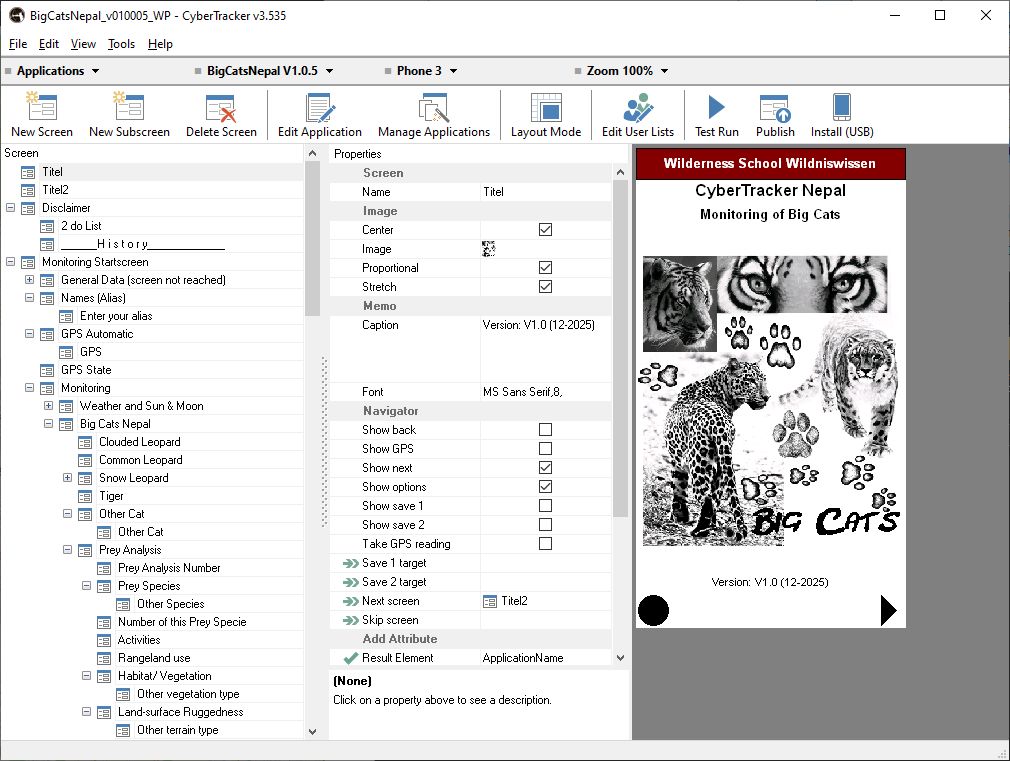
This Windows Software can be downloaded free -> https://cybertrackerwiki.org/ – CyberTracker Classic -> Download.
This wiki page documents numerous features and is very helpful for many purposes. Many thanks to Justin Steventon.
By the way: It is also possible to built a complete online CyberTracker project in your Browser. This is the best way for simple functionality, because you will not need any other installations. You can find CyberTracker online here -> https://online.cybertracker.org.
More information about CyberTracker ideas, invented from Louis Liebenberg from South Africa you will find here -> https://cybertracker.org/.
A German CyberTracker page is here -> https://www.cybertracker.de/.